Players' guide
Installing and using V3X
Everything a player needs, in the order you need it. No programming involved.
Before you start
- Victoria 3 1.15.1 on Windows. V3X is made for that version. On another version setup warns you first.
- Single player only. Do not use V3X in multiplayer (why, and how to switch it off for a session).
- Back up your saves before you try anything new. They are in
Documents\Paradox Interactive\Victoria 3\save games. - Keep a few GB free on drive C:. An autosave once failed with
Failed to write to diskwhen C: was nearly full.
Install
- Download
V3X-Setup.exefrom the Releases page. The release also lists a SHA-256 checksum (SHA256SUMS.txt) if you want to check the file. - If Windows SmartScreen or your antivirus warns, that is because the file is new and not signed. Choose More info › Run anyway if you trust where it came from.
- Close Victoria 3. Setup refuses to run while the game is open.
- Double-click
V3X-Setup.exe. It finds the game through Steam. If it cannot, it asks for the folder: in Steam, right-click Victoria 3 › Manage › Browse local files, and pick thatVictoria 3folder. - Check that the window says
Game version: release/1.15.1 (supported), then click Install V3X. - Start the game as usual, from Steam or the Paradox launcher.
If your game is a newer version, setup says so and installs only if you click Install anyway. Parts switch themselves off where the game's code changed, but that combination was never tested: waiting for a V3X update is the safe choice.
What setup puts on your PC
Everything goes into the game's binaries folder. No admin rights, no game file changed. Steam's Verify integrity of game files does not remove V3X.
| File | What it is |
|---|---|
binaries\version.dll | The V3X loader. Windows loads it with the game; it loads the plugins. |
binaries\v3x\plugins\*.dll | The plugins: the parts of V3X. |
binaries\v3x\*.ini | Settings. Created only if missing: setup never overwrites yours. |
binaries\v3x\install_manifest.txt | The list of installed files with checksums, used by repair and uninstall. |
binaries\v3x\install.log | What setup did. |
binaries\v3x\backup\version.dll | Only if another tool's version.dll was there before. It is put back on uninstall. |
Without the installer
V3X is pre-release. If the Releases page has no V3X-Setup.exe yet, the only way in today is the developer install: clone the repository into the game folder and run ./build.sh install, which puts the same two items (version.dll and the v3x folder) in place. It needs Python and Git Bash; Getting started walks through it.
The first start
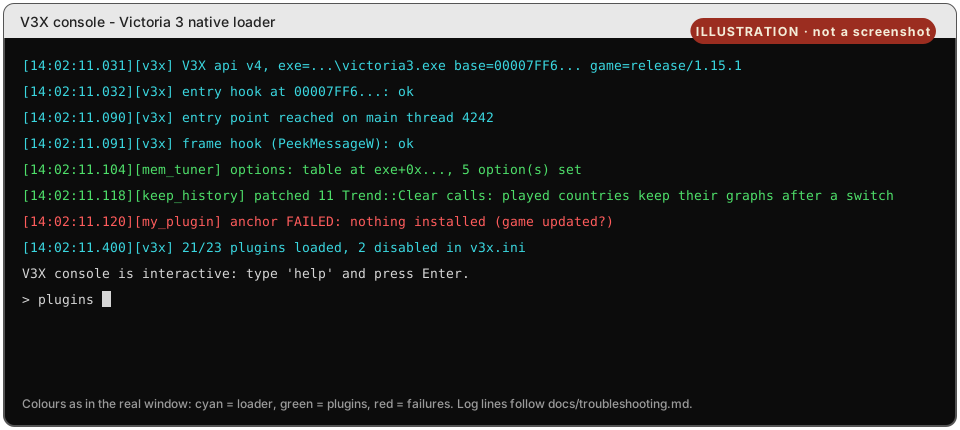
A small V3X console window opens next to the game and lists what loaded. Loader lines, plugin lines, and any part that refused to load, in red, with the reason.
Its close button is removed on purpose: closing a console window would close the game with it. To hide it, add the line console=0 at the top of binaries\v3x\v3x.ini.
If the game seems to freeze while you have clicked into the console window, press Esc: Windows pauses a console while text in it is selected.
The V3X button on the main menu
On the main menu there is a V3X button. It opens a window with a checkbox for each part of V3X. Untick a part to switch it off, tick it to switch it on. The change is written to v3x.ini and applies the next time you start the game.
If a mod of yours replaces the main menu, the button may not show. Everything still works through v3x.ini (section 6). The menu window is one of the newest parts of V3X; if it misbehaves, use the ini file and report it.

What is on, what is off
V3X is a set of parts (plugins). Setup switches on the ones that fix or protect without changing your game, and installs the rest switched off, for you to try.
| Part | What it does for you | After install |
|---|---|---|
mod_menu | The V3X button on the main menu, with a checkbox for each part. | on |
keep_history | Keeps the GDP, population and other graphs of a country you stop playing; AI countries are recorded as often as yours (every 28 days). | on |
mem_tuner | Tunes the game's memory use, gives memory back after loads, keeps a 128 MB emergency reserve and explains an out-of-memory error in the log. | on |
frame_pacer | The frame cap sleeps instead of running a core at 100 %; lower frame rate when paused, idle, in the background or minimised. | on |
cpu_sched | On CPUs with performance and efficiency cores, keeps the game's main thread on the performance cores. Does nothing on other CPUs. | on |
crash_logger | Writes crash.log when something goes wrong: the file to send with a bug report. | on |
ironman_console | Lets the console work in ironman (multiplayer stays blocked). Turn it off if achievements matter to you. | on |
gfx_driver | Asks the graphics driver not to add its own threading. The effect on frame rate is not measured yet. | on |
log_filter | Drops repeated, noisy lines from the engine's logs. | on |
fast_load | Measures loading and tells the other parts when a load starts and ends. | on |
content_packs | Lets files in binaries\v3x\content_packs\ replace game files without a mod. Needed by the V3X button. | on |
lazy_mesh | Loads the 3D models your game uses at start and the rest on first use: 37.5 s down to 6.7 s on the author's PC. | off |
loc_fallback | Fills text that a mod lacks in your language with the mod's English text. | off |
enhance | In debug mode, saves in the normal compressed format: 156 MB down to 26 MB per autosave. | off |
console_plus | Tab completion in the console: country tags, states, laws. | off |
asset_stream | Forces the game's own texture streaming on (every quality preset turns it off). | off |
sim_opt | Simulation diagnostics. Its optional throttle changes the simulation: back up saves first. | off |
Source: docs/install.md and the plugin catalog.
Changing parts by hand
Open binaries\v3x\v3x.ini in Notepad. Under [plugins], write a part's name with =0 to switch it off or =1 to switch it on:
[plugins]
ironman_console=0
loc_fallback=1- A part that is not listed is loaded.
0means "do not load". - Changes apply at the next start of the game.
- Comments go on their own line, starting with
;. A comment after a value becomes part of the value, solazy_mesh = 0 ; testdoes not switch lazy_mesh off. - Each part can have its own settings file,
binaries\v3x\<part>.ini. They are optional; every setting is listed here.
Achievements, ironman, multiplayer
Achievements. V3X does not touch achievement code or DLC ownership and unlocks nothing. One part that is on by default, ironman_console, lets the console work in ironman. If achievements matter to you, set ironman_console=0, and leave the parts that change the simulation (sim_opt's throttle) off.
Multiplayer. Do not use V3X online: other players would run different code, and parts that change the simulation would put you out of sync. Before a multiplayer session, rename binaries\version.dll to version.dll.off, and rename it back afterwards. Or uninstall.
Update, repair, uninstall
Run V3X-Setup.exe again (a newer one to update):
- Repair / update V3X copies back any V3X file that is missing or damaged, or replaces them with the newer version. Your settings are kept.
- Uninstall V3X removes exactly the files setup installed and puts back a
version.dllthat was there before. Logs, reports and settings you changed stay inbinaries\v3x\; tick Also delete logs, reports and settings to remove that folder too.
Lost the setup file? Delete binaries\version.dll and the folder binaries\v3x. That is the whole uninstall.
When Victoria 3 itself updates, parts whose engine code changed switch themselves off until V3X is updated. They say so in binaries\v3x\v3x.log.
When something goes wrong
| Problem | What to do |
|---|---|
| Setup says "Victoria 3 is running" | Close the game (check Task Manager for victoria3.exe), then run setup again. |
| "Victoria 3 was not found automatically" | Pick the Victoria 3 folder, the one with the binaries folder inside. |
| "This setup file is damaged" | Download it again. The file is checked before anything is written. |
| "could not write … is it in use?" | Close the game and any tool that may hold the file, then run Repair. |
| The game does not start or crashes right away | Rename binaries\version.dll to start without V3X. If that helps, switch parts off one by one in v3x.ini to find the cause, or uninstall. |
| Out of memory on New Game | If v3x.log says Windows commit limit is exhausted, make the Windows pagefile bigger (system-managed, or 16 GB or more). |
| A save fails with "Failed to write to disk" | Free several GB on drive C:. The pagefile grows on its drive too. |
| A part does nothing after a game update | Expected: it switched itself off because the game's code changed. Wait for a V3X update. |
Reporting a problem
Before you start the game again, copy these files somewhere, because the next start overwrites them:
binaries\v3x\v3x.log,crash.log,crash.prev.logandinstall.log. If you findv3x.<number>.loginstead, the game's crash reporter was holdingv3x.logopen: send that one.- The game's own logs:
Documents\Paradox Interactive\Victoria 3\logs\.
Technical detail, for whoever reads your report: Troubleshooting.