Victoria 3 eXtender · a script extender for Victoria 3 · it works under the game, not in it
Victoria 3, with its engine looked after.
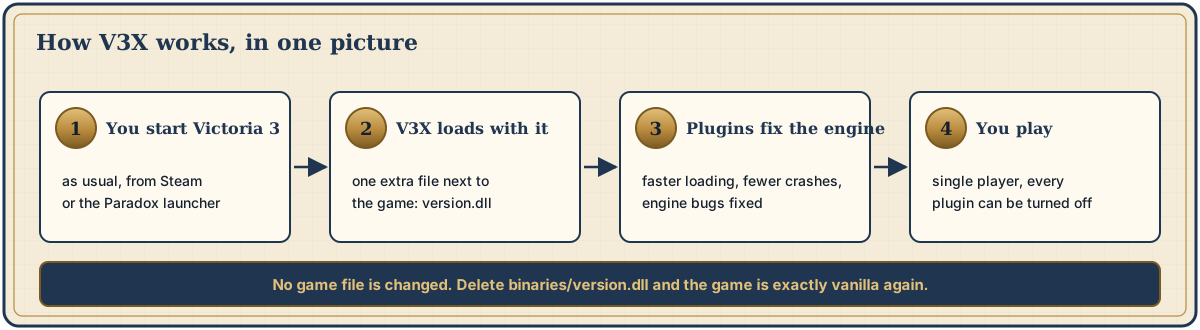
V3X is an add-on that runs underneath the game. It fixes bugs in the engine, takes work out of loading, keeps your graphs, and writes a clear report when something breaks. Your mods and your playset stay exactly as they are. One installer puts it in; one click takes it out.
No admin rights. No game file is changed. Single player only.
| Measure | before | with V3X |
|---|---|---|
| Loading pass over 2,118 kinds of 3D modellazy_mesh · optional | 37.5 s | 6.7 s |
| One autosave in debug modeenhance · optional | 156 MB | 26 MB |
| History graphs after you switch countrykeep_history · on | wiped | kept |
| New Game on a PC short of commit memorymem_tuner · on | crashed | loads¹ |
16 GB RAM, integrated GPU, Victoria 3 1.15.1. Yours will differ. ¹ With a bigger Windows pagefile; the author then played a 4-hour session.
What it does for you
- Graphs that rememberon
- When you stop playing a country, the game wipes its GDP, population and other history graphs. V3X keeps them, and records AI countries as often as yours: every 28 days instead of every 120.
- Fewer out-of-memory crasheson
- The New Game crash came from Windows running out of commit memory while RAM was still free. V3X makes the game reserve less, returns memory after loads and keeps a 128 MB emergency reserve. If memory still runs out, the log says to enlarge the pagefile.
- A processor that can reston
- The frame cap used to keep one core busy at 100 % just waiting. V3X sleeps instead, and lowers the frame rate while you are paused, idle or in another window.
- The right cores on new Intel CPUson
- On processors with performance and efficiency cores, the game's main thread is kept on the performance cores. On other processors nothing changes.
- A V3X button on the main menuon
- Each part of V3X has a checkbox. Untick what you do not want; it applies the next time you start the game.
- A crash report you can sendon
- If the game crashes,
crash.logrecords where and why, in a form a developer can act on. - Console in ironmanon
- The developer console works in ironman. Multiplayer stays blocked. If achievements matter to you, turn this one off.
- 3D models loaded when neededoptional
- Instead of loading every kind of 3D model up front, V3X loads the ones your game uses and the rest when first seen. 37.5 s became 6.7 s on the author's PC.
- English text where a mod has none in your languageoptional
- Mods without a translation show raw text keys. V3X can fill those lines with the mod's English text.
- Smaller saves in debug modeoptional
- Debug mode writes saves as plain text. V3X keeps the normal compressed format: 156 MB became 26 MB per autosave.
Measured, not promised
Every fix went the same way: measure with V3X's own tools, find the cause in the engine, fix it in a plugin, check it against the real game files, then measure again in the game.
| Before | 37.5 s | |
|---|---|---|
| With V3X | 6.7 s |
| Before | 156 MB | |
|---|---|---|
| With V3X | 26 MB |
Measured on the author's PC (16 GB RAM, integrated GPU, Victoria 3 1.15.1). Fig. 1 with lazy_mesh in lazy mode during a 4-hour session, Fig. 2 with enhance. Both parts are optional and off after install.
In one session with 23 mods, the engine made 3.44 million failed file lookups, costing 103.8 s of thread time. A V3X index predicted 94.4 % of them with 0 mismatches. Using it to skip those lookups is the next step, not yet a result.
Is it a mod? Does it replace mine?
No. Mods change what is in the game: events, buildings, laws, the interface. V3X changes how the engine runs: loading, memory, saves, crashes. Both work at the same time.
| Aspect | A Workshop mod | V3X |
|---|---|---|
| Made of | text and data files | a program that loads with the game |
| Changes | content: what is in the game | the engine: loading, memory, saves, crashes |
| Your mod list | is the mod list | untouched; V3X is not in it |
| Multiplayer | yes | no, single player only |
Install in four steps
- DownloadGet
V3X-Setup.exefrom the Releases page. Windows may warn because the file is new and unsigned: choose More info › Run anyway if you trust the source. - Close the game, run setupSetup finds Victoria 3 through Steam. If it cannot, pick the
Victoria 3folder (Steam: right-click the game › Manage › Browse local files). - Check, then installThe window should say
Game version: release/1.15.1 (supported). Click Install V3X. No admin rights needed. - PlayStart the game as usual. A small V3X console window opens beside it and lists what loaded. You can hide it later.
V3X is pre-release. If the Releases page does not list V3X-Setup.exe yet, the first public build is not out; the players' guide explains the other way in.
Turning it off
| You want to | Do this |
|---|---|
| Turn one part off | Main menu › V3X, untick it. Or write name=0 under [plugins] in binaries\v3x\v3x.ini. It applies at the next start. |
| Play once without V3X (for example online) | Rename binaries\version.dll to version.dll.off. Rename it back afterwards. |
| Remove V3X | Run V3X-Setup.exe again and choose Uninstall V3X. It removes exactly the files it installed and puts back anything it replaced. |
| Remove it without the setup file | Delete binaries\version.dll and the folder binaries\v3x. That is the whole uninstall. |
Questions players ask
Is it safe?
V3X changes no game file. It is one extra file next to the game, so Steam's Verify integrity of game files finds nothing changed and leaves V3X in place. Every part can be turned off on its own. After a game update, a part whose engine code changed switches itself off and writes why in binaries\v3x\v3x.log, instead of guessing.
Why does my antivirus or Windows warn me?
V3X loads through a file called version.dll next to the game, a common technique that some antivirus programs flag on principle. The setup file is new and not signed, so SmartScreen may warn too. All the source code is public, and you can build it yourself.
Does it break achievements or ironman?
V3X does not touch achievement code or DLC ownership, and unlocks nothing. But one part that is on by default, ironman_console, lets the console work in ironman. If achievements matter to you, turn it off and leave the optional simulation features off.
Can I play multiplayer with it?
No. V3X is for single player: other players would be running different code. Before you play online, uninstall it or rename binaries\version.dll.
Will my Workshop mods still work?
Yes. V3X does not touch your mod list. A mod that replaces the main menu hides the V3X button, but v3x.ini still works.
Can it break my saves?
Parts that change the simulation are off by default. Back up your saves before you try anything new.
What happens when Victoria 3 updates?
Parts whose engine code changed switch themselves off until V3X is updated. V3X targets 1.15.1; setup tells you if your game version is different and installs only if you insist.
How do I uninstall it?
Run V3X-Setup.exe and choose Uninstall V3X, or delete binaries\version.dll and binaries\v3x. See Turning it off.
Linux, Proton, Steam Deck?
Untested. It may need the launch option WINEDLLOVERRIDES="version=n,b".
Who makes it?
An unofficial fan project, not affiliated with or endorsed by Paradox Interactive. The code is on GitHub.
For modders: a platform underneath
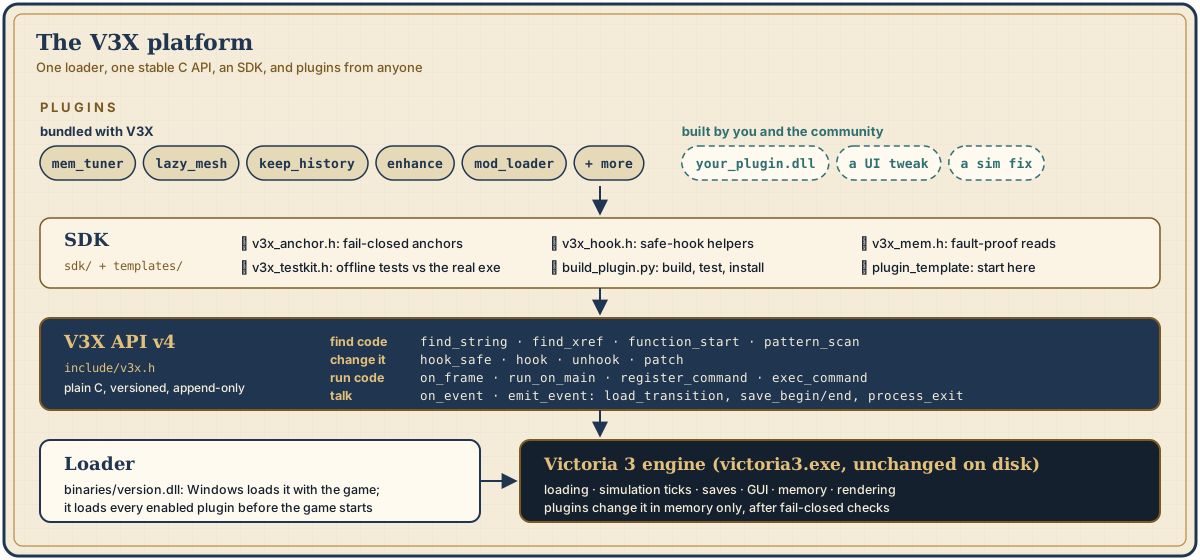
Every part above is a plugin built on the V3X API: a plain-C interface to find engine code that survives patches, hook it safely, read live data, add console commands and react to loads and saves. The SDK tests your plugin against the real game files before you start the game.
Open the modders' documentation →